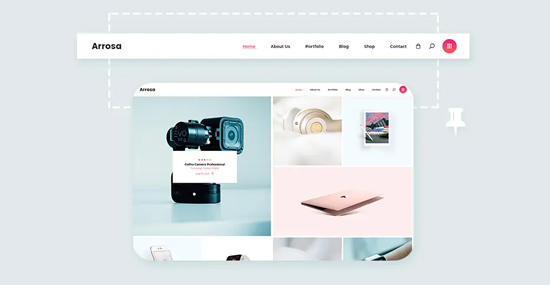
What is a sticky menu?
When the user scrolls the page, a sticky menu is displayed at the top of the page, allowing the user to navigate to any section of the site without having to scroll up.
Most modern WordPress themes support sticky menus by default. But, there are templates for which special styles are not registered for the menu.

How to make a sticky menu?
There are two options for solving this issue:
- Write CSS styles for the menu
- Use a plugin
Let’s consider the second option.
I suggest installing myStickymenu plugin. This plugin for our menu itself prescribes the necessary styles. The main thing is to tell the plugin the correct class of our menu, because there can be several menus on the site.
1. Plugin installation
Through the section Plugins – Add new in the search, specify the name of the plugin “myStickymenu”, or Download myStickymenu here.
Install and activate the plugin.
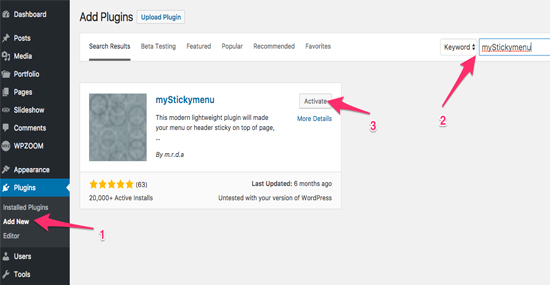
2. Define the ID or Class of our menu
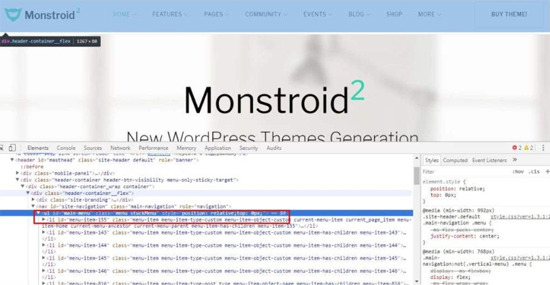
The plugin does not know for which menu we want to create a sticky function. Therefore, we need to find out and specify the ID of our menu.
To determine the menu ID / class, you can use the developer tools that are available in Google Chrome or Mozilla Firefox browsers. Or you can open the header.php file and view the source code.
Related Posts:
3. Plugin settings
The plugin parameters are located in the section: Settings – myStickymenu
All plugin options are divided into three tabs.
General Settings – General Settings
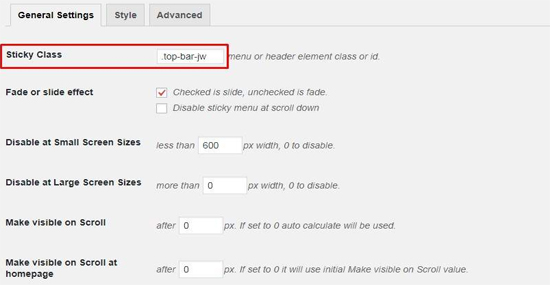
In the Sticky Class field, you must specify the class of our menu. This is the main field.
Disable at Small Screen Sizes — disable the sticky menu on small screens smaller than…
For example, on devices with screens up to 600 px, the sticky menu will not be displayed.
Disable at Large Screen Sizes – Disable the sticky menu on large screens larger than…
Style — Style
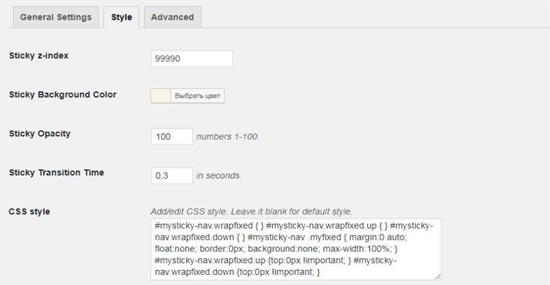
Here you can customize the appearance of the sticky menu and change styles.
Advanced

The sticky menu can be disabled for pages and taxonomies.
Related items: